WhatsApp AI Agents for Indian SMEs: What They Can Automate in 30 Days
What a WhatsApp AI agent can automate for Indian SMEs in 30 days: leads, orders, FAQs, reminders, CRM sync, and when to hand off to a person.

LitSpark Solutions Team
On This Page19 sections
- Table of Contents
- Why WhatsApp is already the front door for Indian SMEs
- What a WhatsApp AI agent actually does
- Chatbot versus AI agent
- WhatsApp Business API rules you need to know
- Use the official API, and get a proper opt-in
- The 24-hour window and template messages
- What you can automate in 30 days
- Human handover and CRM sync
- Automate versus keep a person in the loop
- A week-by-week 30-day rollout
- What not to automate, and other limits
- Frequently asked questions
- What is the difference between the WhatsApp Business app and the Business API?
- Do customers have to opt in before the agent can message them?
- Can the agent work in Hindi or other Indian languages?
- Will a WhatsApp AI agent replace my staff?
- Keep Reading.
- Want Help Putting This Into Practice?
If your customers already message you on WhatsApp, the problem is rarely a lack of chats. Leads arrive after hours, the same questions repeat every day, and order or booking updates are still typed by hand. A WhatsApp AI agent can take on that repetitive work in about 30 days, provided you start with one clear job, use Meta's official WhatsApp Business Platform, and keep a person in the loop where it matters.
This is already how a large share of Indian buyers prefer to talk. In GWI's Q2 2026 survey, published in DataReportal's Digital 2027: India report, 87.7% of Indian internet users aged 16 and over said they had used WhatsApp in the past month.
Table of Contents
- Why WhatsApp is already the front door for Indian SMEs
- What a WhatsApp AI agent actually does
- WhatsApp Business API rules you need to know
- What you can automate in 30 days
- A week-by-week 30-day rollout
- What not to automate, and other limits
- Frequently asked questions
Why WhatsApp is already the front door for Indian SMEs
Enquiries arrive from a website button, a Google Business Profile, a Click-to-WhatsApp ad, or a number on packaging. TechCrunch reported in December 2025 that WhatsApp is used by more than 500 million people in India. Sensor Tower data shared with that article found that 94% of WhatsApp's Indian monthly user base opened the app daily in November 2025, Indian users spent an average of 38 minutes a day in it, and WhatsApp Business monthly active users in India were up more than 130% compared with 2021, with 67% of those Business users opening the app daily.
A half-watched inbox hurts at that scale. The fix is a first workflow that answers quickly, updates your systems, and knows when to step aside.
What a WhatsApp AI agent actually does
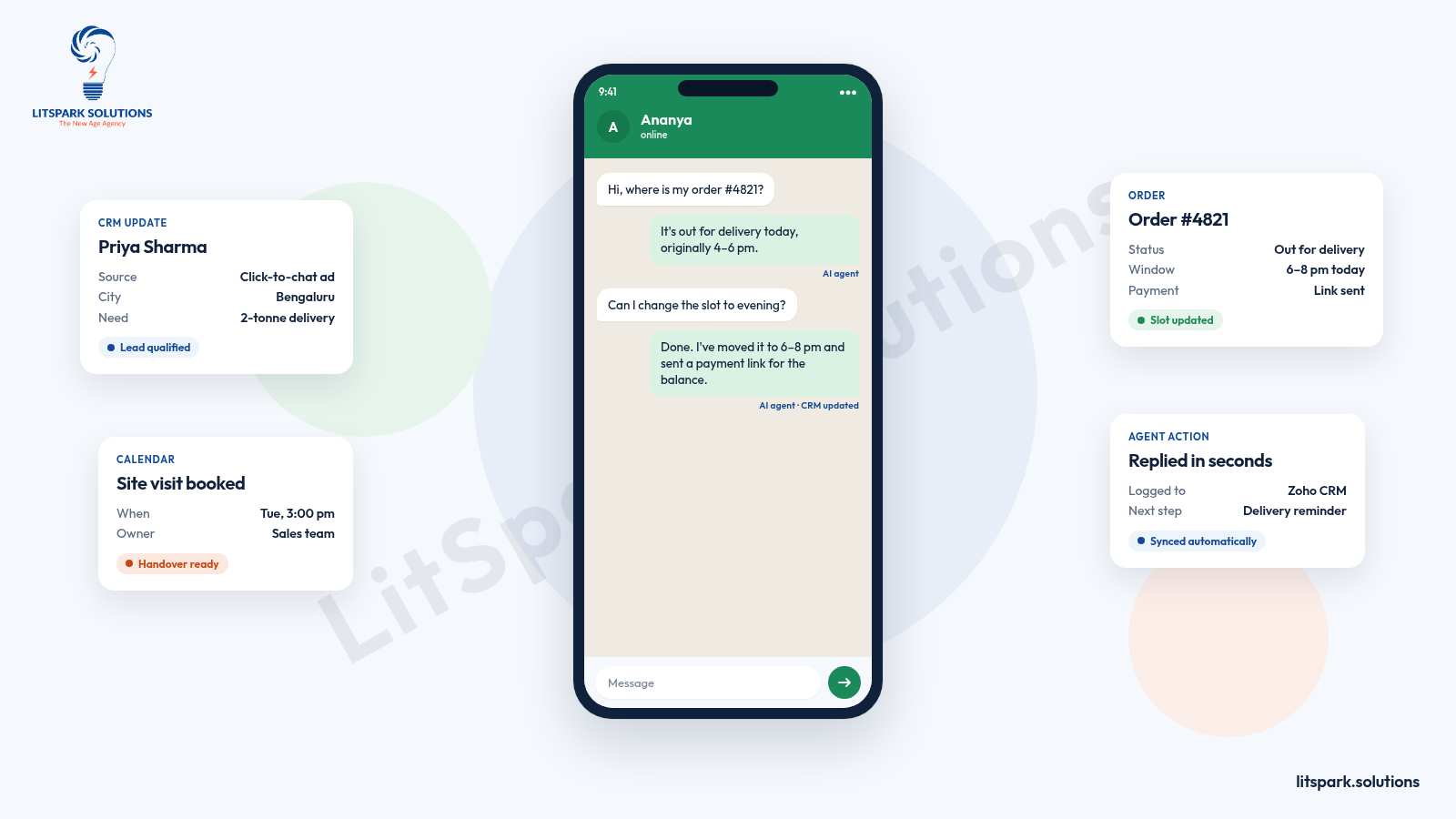
A WhatsApp chatbot answers questions from your content. A WhatsApp AI agent goes further: it can look up a record, update your CRM, book a slot, send a payment link, or pass the chat to a person with the full conversation attached.
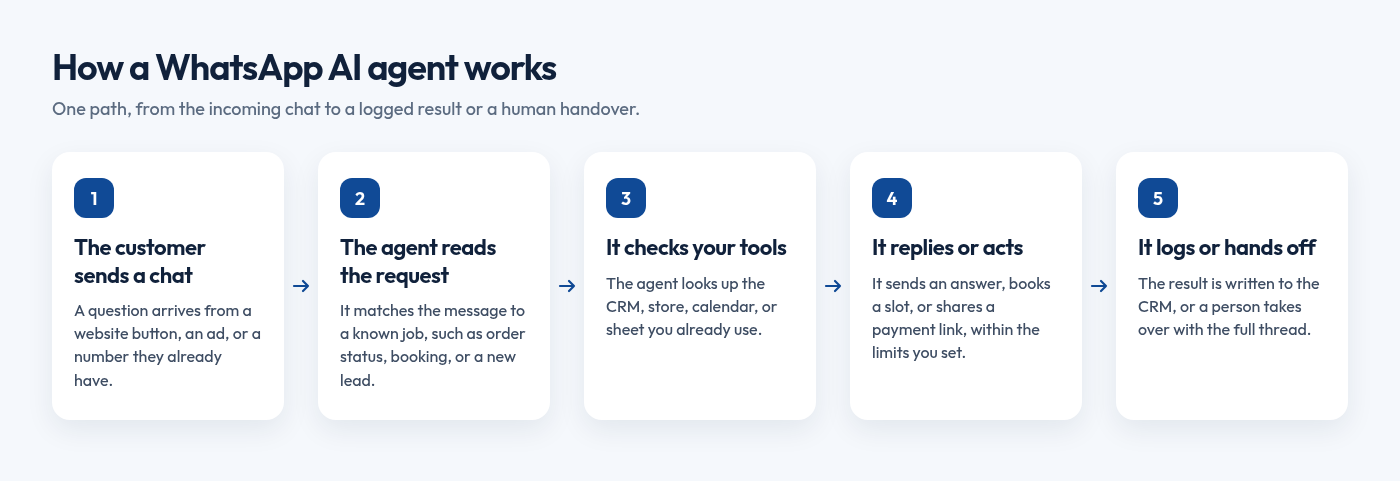
If a staff member currently reads a message, checks a system, and types the same kind of reply, an agent can often do that work. If the message needs judgement, a person should take over. The same idea sits behind a well-designed conversational interface: the chat is useful only when it is connected to a real job.
Chatbot versus AI agent
| Chatbot | AI agent | |
|---|---|---|
| Job | Answers questions from your approved content | Answers, then takes actions in your tools |
| Typical use | FAQs, menus, simple lead capture | Lead qualification, bookings, order updates, CRM updates |
| Handover | Passes the chat when it is stuck | Passes the chat with the full thread, plus what it already did |
| Best first step | High-volume repeat questions | A repetitive job with clear rules and a system to update |
Practical rule: If a staff member reads a message, checks a system, and types the same kind of reply, let the agent do that work. If the message needs judgement, a person should take over.
Start with one workflow that has clear volume and clear rules, such as lead qualification, order status, appointment booking, or payment reminders.
WhatsApp Business API rules you need to know
Use the official API, and get a proper opt-in
The WhatsApp Business app is for a team typing messages by hand. An AI agent needs the official WhatsApp Business Platform, also called the Business API, which supports approved templates, several agents, automation, and a connection to your CRM or store. LitSpark's WhatsApp marketing work starts with that official setup, including Meta Business verification, templates, and chatbots. Use only the official API. Unofficial bulk-sender tools break WhatsApp's rules and often get numbers banned.
You may contact people only if they have given you their mobile number or username, and they have opted in to later messages or calls. A purchased list is not an opt-in. A website form, checkout box, keyword opt-in, or the customer starting the chat can all work if the permission is clear. Meta recommends covering the types of messages you will send, and offering a simple opt-out, which you must honour.
The 24-hour window and template messages
When a customer messages you, a 24-hour customer service window opens. If they message again before it ends, the window resets. Inside that window you can send ordinary free-form service messages. Outside it, you may only send pre-approved templates.
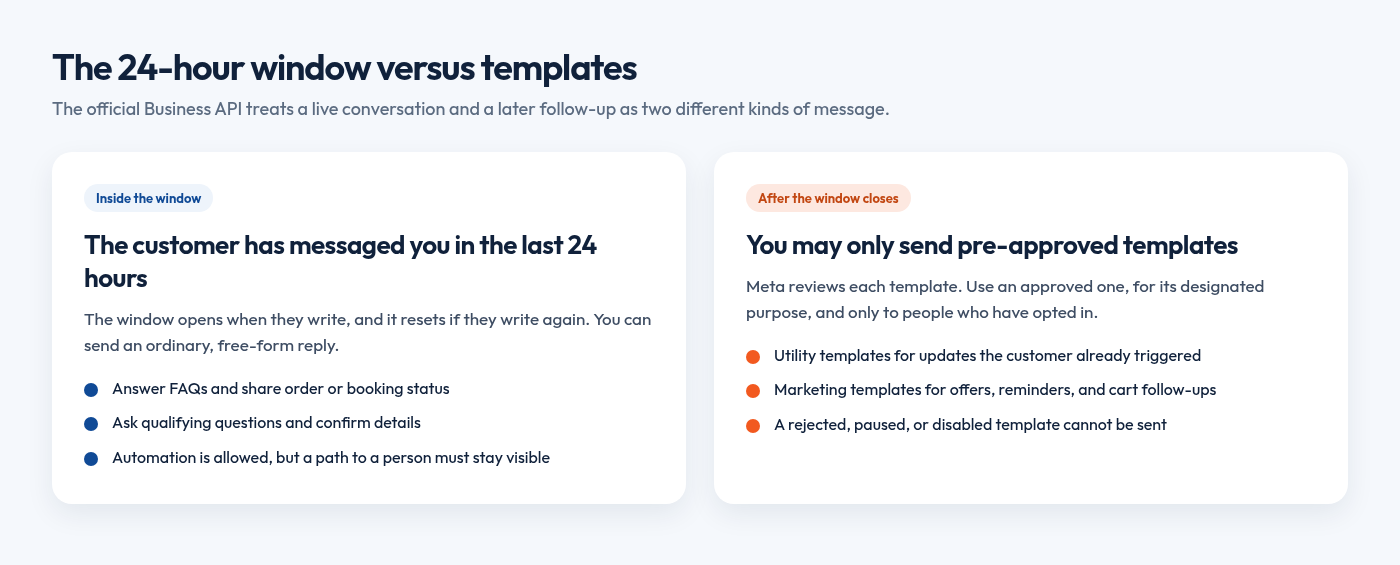
Meta reviews templates. You can send an approved template, but not a rejected, paused, or disabled one, and only for its designated purpose. Utility templates cover updates the customer already triggered or needs. Marketing templates cover offers, promotions, product suggestions, and abandoned-cart reminders. Authentication templates cover one-time passwords.
You may automate replies inside the window, but Meta requires a clear path to a human, such as an in-chat transfer, a phone number, email, web support, a store visit, or a support form.
Meta charges businesses per delivered message for the messages they send to users. Rates vary by category and market, so check Meta's current WhatsApp Business Platform pricing before you budget.
What you can automate in 30 days
- Lead qualification. The agent greets a customer from a Click-to-WhatsApp ad or website button, asks a short set of questions (budget, location, timing, product or service), and either books a call or flags the chat for sales.
- Order and booking updates. Connected to your store, delivery partner, or calendar, it can answer "Where is my order?" or "Can I change my slot?", confirm a booking, or offer a reschedule path. These are usually utility messages when they concern an existing order or booking. Use an approved template when the 24-hour window is closed. Status should come from the system, not from memory, which is the same idea behind a clean order management system.
- FAQs. Prices, delivery areas, working hours, return policy, required documents, and stock questions are good first candidates, as long as answers come from your approved content. If the agent is unsure, it should say so and hand over. Test it in the languages your customers actually use, including Hindi or mixed Hindi and English.
- Payment reminders. The agent can remind opted-in customers about renewals, invoices, or booking payments, share a payment link, and log the outcome. Do not collect full card numbers, bank account numbers, or personal ID numbers in the chat. Meta's business policy prohibits asking for those details on WhatsApp. Use a proper payment link instead.
Human handover and CRM sync
Handover is not a failure. The agent should pass the chat to a person when the customer asks for one, when the request is sensitive, when a refund or exception is involved, or when it cannot finish the task. The person who takes over should see the full thread, and someone should be on duty after hours.
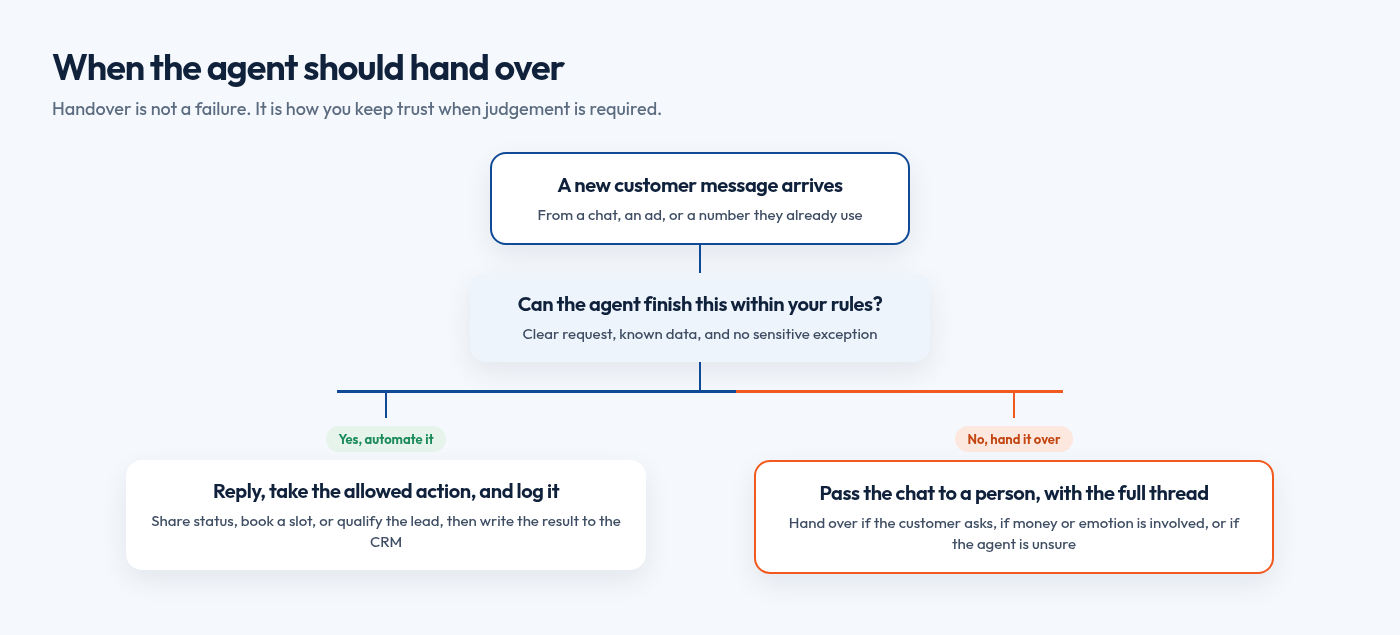
Connect the agent to tools you already use, such as Zoho, HubSpot, Shopify, WooCommerce, or Google Sheets, and log the contact, source, and next step. If the CRM is not updated, the agent has only answered a chat. When the workflow also needs a custom product or a tighter integration, custom development can sit alongside the agent.
Automate versus keep a person in the loop
| Automate this | Keep a person in the loop |
|---|---|
| FAQs from approved content | Complaints and charged conversations |
| Order and booking status | Refunds, discounts, and exceptions |
| Lead qualification questions | Negotiation and judgement calls |
| Payment links and reminders | Card, account, or ID numbers in the chat |
| Writing the outcome to the CRM | Medical or legal advice |
A week-by-week 30-day rollout
A focused first workflow can go live in about a month. LitSpark's automation work typically starts with a process audit in week 1, a working prototype in week 2, and a live workflow in your tools in weeks 3 to 4. Official API setup, including Meta Business verification, often takes 5 to 10 working days, so begin it in week 1. That matches a wider point: automate the manual workflow before you try to scale it.
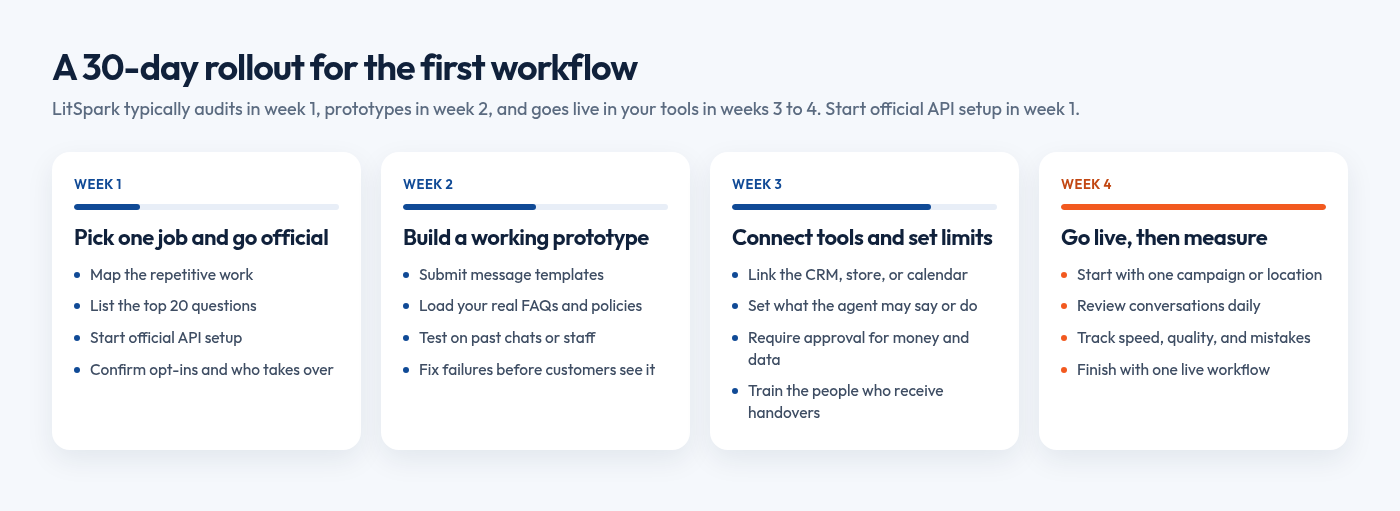
- Week 1: Pick one job and get the official number live. Map the repetitive work and list the top 20 customer questions. In parallel, set up the official API, confirm which contacts are already opted in, and decide who will take over chats the agent cannot finish.
- Week 2: Build a working prototype. Submit the templates you will need. Meta has to approve them before you can send them outside the 24-hour window. Load your real FAQs, prices, and policies, then test on past chats or a staff group before any customer sees it.
- Week 3: Connect your tools and set limits. Connect WhatsApp to your CRM, store, calendar, or sheet. Set hard limits on what the agent may say or do. Anything that touches money, cancellations, or personal data should have an approval step or a handover rule, plus a log of every action. Train the people who receive handovers.
- Week 4: Go live carefully, then measure. Start with one campaign, location, or product line. Review conversations daily. Track response time, conversations resolved without a person, handover quality, qualified leads or bookings, and mistakes that needed correction.
Launch rule: End the month with one accurate, logged workflow, not a dozen half-finished flows.
What not to automate, and other limits
Keep the first month tight, and stay inside these limits:
- Do not automate complaints, disputes, or emotionally charged conversations.
- Do not let the agent approve refunds, special discounts, or exceptions unless a person has signed off, or the action is inside a pre-agreed limit.
- Do not use it for medical or legal advice, or for health information where the rules do not allow it.
- Do not message people who have not opted in, or who have asked you to stop.
- Do not send promotional content on a utility template, or treat abandoned-cart offers as service messages. Meta classifies those as marketing.
- Do not collect sensitive identifiers in the thread.
If customers block or report the number, Meta can limit how many messages you can send. Grey-market bulk tools are a way to lose the number, not a shortcut.
Frequently asked questions
What is the difference between the WhatsApp Business app and the Business API?
The WhatsApp Business app is for a team that replies by hand. The official Business API is what you need for an AI agent: approved templates, automation, several agents, and CRM or store connections.
Do customers have to opt in before the agent can message them?
Yes. They must have given you their number or username, and they must have opted in to later messages. When a customer messages you first, you can reply inside the 24-hour window. To write after that window closes, you still need the opt-in and an approved template.
Can the agent work in Hindi or other Indian languages?
Yes, if you test it in the languages your customers use. LitSpark's chatbot work covers English, Hindi, Kannada and other languages, including mixed Hindi-English.
Will a WhatsApp AI agent replace my staff?
It should take the repetitive steps, not the judgement. Your team still handles exceptions, negotiations, and anything sensitive.
Keep Reading.
- Why Companies in 2026 Should Automate Manual Workflows Before They Scale
- Conversational User Interface: 2026 Guide for Business
- Order Management System Ecommerce: The Complete 2026 Guide
Want Help Putting This Into Practice?
Tell us what you're working on. We'll reply within 24 hours with next steps.
See Automate Your Business for how a first workflow is scoped, or WhatsApp Marketing if you also need official API setup, templates, and campaigns. Email business@litspark.solutions, or book a discovery call.
Written By
LitSpark Solutions Team
We build websites, apps and AI automations, and run marketing for growing businesses from Bengaluru. These guides come from that work. About us